Thursday, August 26, 2010

PowerPoint vs Prezi


Prezi is a non-linear presentation tool which allows you to start at the top of a concept (a top-down perspective) and allows the audience to see all the component parts of the concept or topic. The presenter or the audience can then explore randomly, or along a fixed path, and identify and discuss the various components. Although Prezi is new and exciting I have decided to choose PowerPoint as my tool of choice. I am not saying that Prezi does not have its advantages although I believe the ease and efficient way I can change slides and the order of my presentation will be of a great advantage in the classroom. As an added note, Prezi with all its swirling and turning makes me feel a bit nauseous. Call me old fashioned but I am discovering more and more reasons to be impressed by PowerPoint every time I use it. Here is a list of only a few of the possibilities of using this great tool:


Creative Presentation Ideas

Flash Cards -
Create Flashcard presentations for individual and group reinforcement. You can create a template and choose whether you or your students will insert the words or phrases. Topics may include: reinforcing math concepts; practicing parts of speech; practicing spelling; reinforcing story problems; and reinforcing numbers, letters, or colors.

Field Trip Slide Shows - Develop field trip slide shows to review and apply knowledge learned on a field trip. Students can work together to make a slide show that presents what they saw, as well as what they learned.

Autobiographical Stories - Students can create short autobiographical stories about themselves. Scanned photos can be inserted for interest. Once the slides are complete, you can put them together in a presentation to show an audience, such as an open house or parent night.


Interactive Book Reports - Have students create a PowerPoint presentation about books they read.


Music Class Recitals - For music teachers, PowerPoint is a useful tool for creating slide shows of student recitals. During a recital, take pictures of the students while they are performing and record a small portion of their music. On slides, include both each student's picture and music.

Group Slide Shows - Give your students a topic (such as zoo animals) and tell them to choose parts of the topic to focus on (such as specific zoo animals). Have students research their assigned portions of the topic and develop slides to serve as a part of a group presentation about the topic.

Poetry Readings - Students can create slides exhibiting their personal poetry along with a voice recording.

Science Presentations - Use PowerPoint to teach processes and how things work. Teachers or students can add additional items to a diagram to illustrate how a process grows and changes. Science principles work well using this format.

Student Portfolios - PowerPoint can be used to create portfolios of student work.

Class Yearbook-Type Presentations - Collect photos; information about special events; examples of class and student projects, etc. throughout the year and create a year-in-review presentation.


PowerPoint presentations are excellent tools for use for parent events. For open house or parent night events, develop presentations with automatically timed slide shows. Have these presentations running in the background.

  1. Create a PowerPoint presentation to inform parents and remind students of classroom expectations, policies, and other important information.
  2. Develop a student slide show that includes digital pictures of each student with notes to their parents.
  3. Design slide shows to exhibit student work.

image from www.flickr.com/search/PowerPoint

Wednesday, August 25, 2010

Google Earth


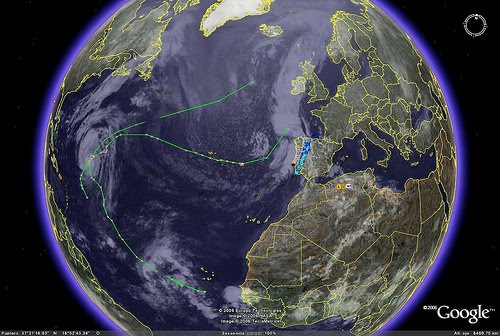
Google Earth lets you fly anywhere on Earth to view satellite imagery, maps, terrain, 3D buildings, from galaxies in outer space to the canyons of the ocean. You can explore rich geographical content, save your toured places, and share with others. In my Grade 3 classroom I can once again see endless opportunities for higher order thinking here. Not only in the ways I mentioned when discussing Google Maps but even extending further in SOSE and Science units. Imagine my Grade 3 class on a under sea adventure to investigate tidal patterns of our coasts or next term when we dive into economic trade (a topic that certainly could use some engagement tools) we can visit these places as a class to bring a real connectedness to the classroom. The Productive Pedagogies framework supports connectedness and supports student's engagement with real, practical or hypothetical problems which connect to the world beyond the classroom, which are not restricted by subject boundaries. Google Earth is certainly a great example of connectedness and once again a huge tick for my Grade 3's :)


Education Queensland. (2002). Productive pedagogies. Classroom reflection manual. Brisbane, QLD, Australia: Author.

Digital Video

The first thing I thought of during the week of Digital Videos was an earlier assessment task during first year. Not only was I completely overwhelmed when I discovered that we had to make a movie of "Our Arts Journey" but also extremely excited! Take a quick look at the movie I made for my assessment task. It may not be the most advanced or even polished movie but the satisfaction that I felt was a highlight of my first year at university. Having never made a movie (I had not long learned how to upload a photo) I spent hours at home playing around learning how to add music and voice overs and the best part was I got to star in my own movie!!

Enough about me and more about the context....well I know if I enjoyed using PhotoStory3 to create this movie, my Grade 3 class would love it too! As I have mentioned in previous posts, our unit this term is heavily art based so I have been taking many photos of the pieces of art that the children have created throughout the unit. I plan to collate the pictures at the end of the unit to play at the final week of term as a tool for analysis and reflection. This will provide the perfect arena for the students to get an overview of their growth throughout the term.

Throughout the movie we are creating on my student's 'Art Journey' I am asking the students to use voice overs to list pros and cons of specific art and consider alternative perspectives of other audiences and cultures. Recording this information and using it again as a reflection tool promotes higher-order thinking and critical analysis. The decision to use PhotoStory3 over Movie Maker was purely a logistical one. My grade three class has 6 digital cameras available to us at any time where there is only 1 digital video camera in the whole school. Once we have completed the movie in this unit using PhotoStory3 I will progress to Movie Maker and use video footage as well.

I am especially eager to use digital video as a reflection tool at the end of this unit. I am also extremely happy with the motivation and engagement level in the classroom when we are using this tool throughout the learning experiences.

Digital video gets a big tick for opportunities in my context!

Google Maps


Well this one is definitely a keeper! It doesn't take much time thinking before my excited imagination comes up with engaging and imaginative ways I could use Google maps with my grade 3 class. I have recently created a unit that I am implementing in fourth term with them - it is based on making a virtual zoo for another grade 3 class in the remote town of Port aux Basques, Canada. After exploring with Google maps this week I have now modified my first lesson to introduce the unit using Google maps. We are going to have a street view vision of Port aux Basques primary school on the screen to introduce the unit. We will spend the whole first lesson looking at the surrounding of their school, zooming out to explore the town, zooming out further to look at the distance between their school and ours! I'm excited and I know the kids are going to love it.

Monday, August 16, 2010

Using YouTube in the classroom

In our current unit on "Who put the Art in Artist", we are researching Vincent van Gogh and his awesome art. Why would I show Vincent van Gogh's pictures in a book to students when they can see and hear his amazing story and paintings on this great YouTube clip:

Animations and Simulations - Team skills exercise for Year 3

Why would I as the learning manager give instructions ever again!!! I think Voki is a great tool for engaging students while promoting an independent learning environment. I can set my Year 3 class up with the link and they can follow the instructions to complete activities at their own pace. What a great tool for students who want to come back and clarify instructions. Take a look at this one I created for my class:


More animations and simulations - World Cup for Year 3


This is an example of how I could use Xtranormal with my Year 3 prac class:
This week in the classroom we have been learning about team sports and what being part of a team means. Xtranormal would be a great tool for enabling students to demonstrate their learning on this topic. We have looked at teams in sports, politics, music and families. Take a look at the movie I created demonstrating some of the thinking we have explored on what being part of team is:
http://www.xtranormal.com/watch/6942253/


picture from http://www.flickr.com/